Quorum · The Chapter Platform
Text messages
The SMS program, in full · Updated August 19, 2026
Quorum runs private members-only platforms for executive peer chapters. A chapter can offer its members text-message notifications as a third delivery rail beside in-app notifications and email. This page is the program’s complete public description: who can receive texts, exactly how a member consents, the words shown at the moment of consent, and every way out.
For carrier and campaign reviewers: this page is the program’s hosted opt-in evidence. The consent screenshot below shows the opt-in controls exactly as members see them - the mobile phone number field and the consent switch on one screen, above the printed program terms. The governing documents are the Privacy Policy and the Terms of Service.
The short version. Texts go only to a chapter’s own verified members, only if they turned texting on themselves - it is off by default for everyone. Frequency varies with chapter activity; message and data rates may apply. Reply STOP to stop, HELP for help. Consent is never a condition of membership, and mobile numbers are never shared with anyone for marketing.
What a chapter texts
A text is the same notification a member already chose to receive, delivered to their phone: an event invitation or reminder, an RSVP or payment confirmation, a chapter announcement, activity in a private forum they belong to. Each text is sent as the activity happens, and only to a member who chose to hear every update by text; a member who chose a daily or weekly summary receives no texts at all. Every text names the chapter first and carries a personal link that opens the member’s own app or signed-in web session right where the update happened.
- Members only. Recipients are existing, verified members of the chapter, with accounts the chapter created. There is no public signup, no marketing to non-members, no purchased or third-party lists, and no lead generation - ever.
- Opt-in only. The text switch is off by default for every member. Nobody receives a text without the switch having been turned on for their own account.
- Automated, low volume. Texts mirror chapter activity, typically a few per month. Frequency varies with the chapter’s calendar.
How a member opts in
- The member signs in to their chapter’s own member site or its iOS app. Accounts exist only for the chapter’s verified members and their households.
- They open You → Notifications. Under Also by text sit a labeled Mobile number field and one switch: Text me too.
- They enter or confirm the mobile phone number their texts should go to, in the Mobile number field on that same card. The number saves to their own profile; without one, the switch stays disarmed.
- They turn the switch on. It is off by default, never pre-checked, and sits directly beneath the number field and directly above the program terms, reproduced below exactly as they appear in the product.
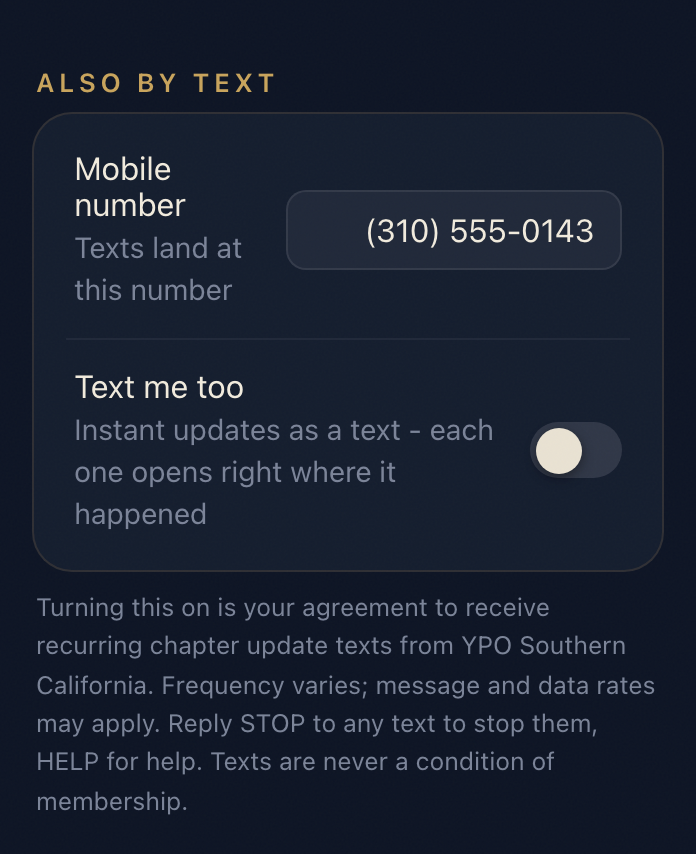
The words at the switch: “Turning this on is your agreement to receive recurring chapter update texts from YPO Southern California. Frequency varies; message and data rates may apply. Reply STOP to any text to stop them, HELP for help. Texts are never a condition of membership.”
A member can also ask the chapter office to turn texts on for them - some prefer to ask a person. The office flips the very same switch on the member’s account, and the platform immediately sends the member a confirmation text carrying the program terms, so the consent and the way out land on the handset itself:
The confirmation text: “Texts are on for chapter updates. Frequency varies. Msg & data rates may apply. Reply STOP to stop, HELP for help.” - prefixed with the chapter’s name, as every text is.
A member who has replied STOP cannot be opted back in by the office: the confirmation is refused by the carrier-side suppression and the switch goes right back off. Only the member can resume texts, by replying START or flipping their own switch after texting START.
How texting stops
- Reply STOP to any text. Delivery ends immediately at the carrier edge, and the member’s switch turns itself off so their settings tell the truth.
- Reply HELP to any text for assistance with the program.
- Flip the switch - the same Text me too control, any time, on the web or in the app.
- Ask the chapter office, which can turn the switch off on the member’s behalf.
Carriers are not liable for delayed or undelivered messages.
Privacy
No mobile information is shared with third parties or affiliates for marketing or promotional purposes. A member’s phone number and text-messaging opt-in status are used for exactly one thing - delivering the chapter updates they asked for. Delivery is performed by Twilio as a processor on the chapter’s behalf, and every send and its carrier outcome is ledgered so the chapter can answer for what was sent. The full policy is the Privacy Policy, whose Text messages section governs this program; the service terms are at Terms.
Questions
A member’s chapter office answers for its own instance. For the platform itself: support@quorum.rsvp